

Fahmeena creates practical and reader-focused content across technology, digital marketing, business and emerging digital trends.

Sameena reviews published content for clarity, factual presentation, consistency and overall reader usefulness.
Git GUI tools are graphical programs which assist programmers to utilize Git (version control) without having to depend on command-line instructions alone. Tower is an effective Git client that simplifies the interactive rebase and merge process among developers. Its user-friendly interface and powerful functionality will reduce complex versions control procedures to simple and easy to manage processes.
Software Tools
Table of Contents
What Do Git GUI Tools Do?
The common Git tasks that are offered using GUI tools are:
- Development and administration of repositories.
- Modelling commit history as graphs or timelines.
- Staging, committing, pushing, and pulling changes.
- Handling branches and merges
- Resolving merge conflicts visually
- Connecting to GitHub, GitLab, or Bitbucket
Why Use Git GUI Tools?
Git GUI tools can also fit well into remote development workflows, especially when teams rely on communication, project management, and collaboration software. Developers working remotely can explore these best apps for work from home to build a more organized and productive setup.
| Benefit | Explanation |
| Beginner-friendly | No need to memorize Git commands |
| Visual clarity | See branches, commits, and changes clearly |
| Faster workflows | Perform common actions with clicks |
| Error reduction | Less risk of mistyped commands |
| Team collaboration | Easier to understand project history |
Key Features of Git GUI Tools
When working remotely, teams often share recorded meetings, presentations, and other media files. Understanding the different video file formats can help ensure that shared videos are compatible across devices and platforms.
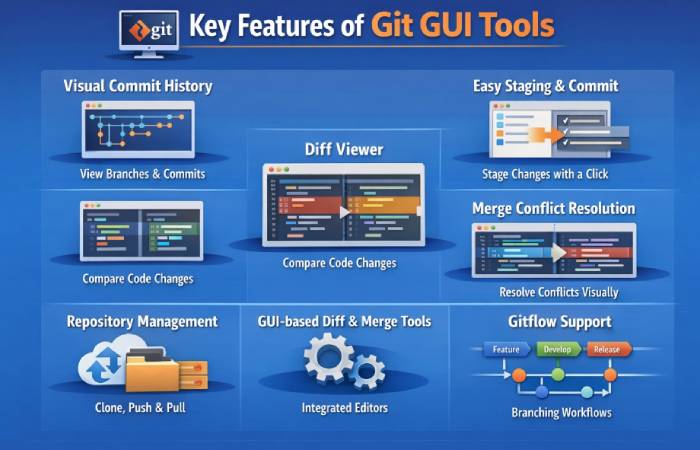
| Feature | What It Does | Why It’s Useful |
| Visual Commit History | Displays branches, commits, and merges as graphs | Makes it easy to understand project flow and history |
| Easy Staging & Commit | Stage files and commit changes with simple clicks | Beginner-friendly and faster than CLI commands |
| Diff Viewer | Shows side-by-side code changes | Quickly identify what was added, removed, or modified |
| Merge Conflict Resolution | Highlights conflicts visually | Simplifies resolving conflicts without manual edits |
| Repository Management | Clone, push, pull, and manage repositories | Centralized control over Git operations |
| GUI-based Diff & Merge Tools | Built-in visual comparison and merging | Reduces errors during merges |
| Gitflow Support | Supports feature, develop, release branches | Helps teams follow structured workflows |
| Branch Management | Create, rename, delete, and switch branches | Improves productivity in multi-branch projects |
| Remote Repository Integration | Connects with GitHub, GitLab, Bitbucket | Seamless collaboration with teams |
Understanding Interactive Rebase in Git
Interactive rebase is a game changing feature in Git where a developer is able to reorganize commit history with accuracy and control. This is one of the methods you should keep in your version control kit because whether you are cleaning up development branches, or you are bringing together changes related to your project, this technique becomes a very key tool.
Although command-line interactive rebase may seem to be more of a technical maze, the current Git GUI tools have been developed and made more accessible and user-friendly. Our study indicates that Tower is the most extensive product that can be used by developers to simplify their Git workflows.
Challenges with Command-Line Interactive Rebase
Developers working from home can also use Git GUIs to manage repositories, review changes, create branches, and collaborate on projects without relying entirely on command-line tools.
The interactive rebase command line by Git usually poses a great difficulty to developers. These difficulties in technology may transform what seemed like an easy task into a frustrating experience:
- Complicated Command Syntax: Rebase command involves the thorough knowledge of particular procedures such as pick, edit, squash, and fixup. A single misplaced command is enough to crash your business.
- Workflow Disruptions: Have syntax errors in your rebase command list, which will cause your operation to jump off the cliff and you will be required to re-start the whole process.
- Limitations with Visualization: In the absence of graphical user interface, the complex associations among commits will be more difficult to understand.
- Complexity of Conflict Resolution: Multistage approach to conflict management during rebase operations introduces additional layers of technical complexity that even seasoned developers might be confused in face of.
All these constraints make the introduction of more friendly, workflow-oriented interfaces that can remain used to simplify interactive rebase operations a necessity.
Technical Requirements for Interactive Rebase Interfaces
When evaluating Git graphical interfaces, we focused on tools that excel in critical areas essential for modern development workflows. A robust interactive rebase tool must provide comprehensive capabilities that go beyond basic version control functionality.
Core Interactive Rebase Requirements
The ideal Git GUI tool should offer:
| REQUIREMENT | DESCRIPTION | IMPORTANCE |
| History Visualization | Clear, intuitive representation of commit relationships | Critical |
| Commit Manipulation | Seamless reordering, squashing, and editing of commits | High |
| Conflict Resolution | Integrated, user-friendly approach to handling merge conflicts | Essential |
| Performance | Smooth operation with repositories of all sizes | Crucial |
| Cross-Platform Support | Consistent experience across different operating systems | Important |
Many existing tools fall short in these key areas. Common weaknesses include poor conflict resolution workflows, performance issues with large repositories, and confusing commit topology displays.
Advantages and Disadvantages of Git GUI Tools
When installing software for remote work, users should verify that downloads come from legitimate sources and understand what the software does before installing it. For example, resources discussing X-Force 2018 can help readers understand the software and its associated considerations.
Best Git GUI Tools Countrywise
United States — Top Git GUI Tools
| Tool | Platforms | Pricing | Best For | Resource / Link |
| GitKraken | Windows, macOS, Linux | Free / Paid (starts ~$4.95/user/mo) | Teams & visual workflows | https://www.gitkraken.com/ |
| Sourcetree | Windows, macOS | Free | Beginners, Atlassian users | https://www.sourcetreeapp.com/ |
| GitHub Desktop | Windows, macOS | Free | GitHub integration & beginners | https://desktop.github.com/ |
| Fork | Windows, macOS | ~$49.99 one-time | Lightweight, fast UI | https://git-fork.com/ |
| Tower | macOS, Windows | ~$69–$149/year | Professional teams | https://www.git-tower.com/ |
| SmartGit | Windows, macOS, Linux | Free (non-commercial) / ~$109–$299 (commercial) | Power users, multi-VCS support | https://www.syntevo.com/smartgit/ |
| Sublime Merge | Windows, macOS, Linux | ~$99 one-time | Advanced diff/merge tool | https://www.sublimemerge.com/ |
| TortoiseGit | Windows | Free | Windows Explorer integration | https://tortoisegit.org/ |
India — Top Git GUI Tools (Commonly Used by Developers)
(Most tools used in India are the same global products; pricing may vary due to currency conversion and billing region.)
| Tool | Platforms | Estimated India Pricing | Best For | Resource / Link |
| GitKraken | Windows, macOS, Linux | ₹400-₹1500/month (approx) based on $ pricing | Teams & visual workflows | https://www.gitkraken.com/ |
| GitHub Desktop | Windows, macOS | Free | GitHub users & beginners | https://desktop.github.com/ |
| Sourcetree | Windows, macOS | Free | Beginners & Bitbucket users | https://www.sourcetreeapp.com/ |
| Fork | Windows, macOS | ~₹4000 once (approx) | Lightweight dev workflows | https://git-fork.com/ |
| SmartGit | All major OS | Paid commercial licenses (~₹9000-₹24000) | Experienced developers | https://www.syntevo.com/smartgit/ |
| Sublime Merge | All major OS | ~$99 (~₹8000) | Developers needing detailed diffs | https://www.sublimemerge.com/ |
| TortoiseGit | Windows | Free | Windows users | https://tortoisegit.org/ |
| Git Cola | All major OS | Free | Open-source, simple GUI | https://git-cola.github.io/ |
Advanced Technical Implementation
Squash Operation Sophistication
Tower’s approach to commit squashing demonstrates remarkable technical depth:
| FEATURE | CAPABILITY | USER BENEFIT |
| Intelligent Grouping | Automated commit combination suggestions | Reduces manual effort |
| Flexible Message Handling | Advanced commit message preservation | Maintains context |
| Metadata Management | Robust handling of commit details | Ensures data integrity |
| Edge Case Handling | Management of complex scenarios like empty commits | Prevents workflow disruptions |
Conflict Resolution System
Tower’s conflict resolution workflow stands out through its comprehensive approach:
- Precise, file-level conflict detection
- Integrated three-way diff visualization
- Contextual resolution tools
- Guided workflow that maintains repository integrity
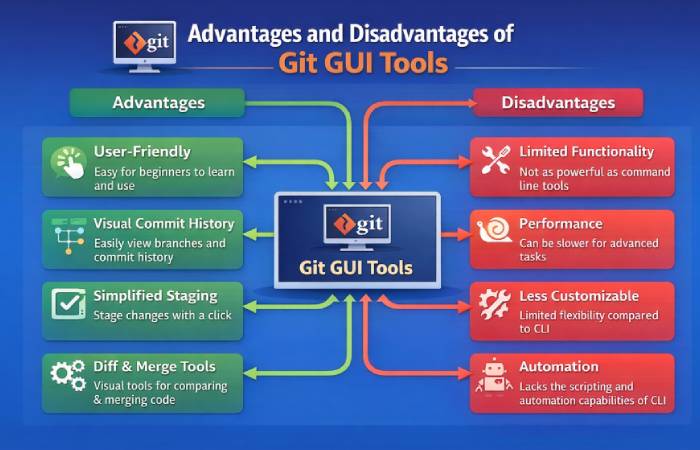
Comparison: Git GUI vs Git CLI
| Aspect | Git GUI Tools | Git CLI |
| Interface | Visual, point-and-click | Text-based terminal |
| Ease of Use | Beginner-friendly | Steeper learning curve |
| Learning Curve | Low | High |
| Speed | Slower for mass commands | Very fast |
| Automation / Scripting | Limited | Excellent (scripts, CI/CD) |
| Feature Access | Core Git actions + visuals | Full Git command set |
| Reviews | Generally positive for major GUIs (e.g., GitKraken ~4.5/5, SourceTree ~4.3/5) | Not review-rated like apps, but widely appreciated for power |
| Pricing (Typical) | Varies by tool: some free, some paid (examples below) | Free (Git itself is free) |
| Most Used In | Popular where visual workflows help (teams in US, Europe, especially larger tech orgs) | Ubiquitous globally outside specific GUI stats; preferred by many professional devs |
| Best For | Beginners, team collaboration | Power users, automation, advanced Git workflows |
| CLI Availability | Some GUIs bundle terminals | Native |
Common Git GUI Tools — Pricing & Popularity
| Tool | Pricing | Notes & Reviews | Usage / Country Bias |
| GitHub Desktop | Free | Easy GUI tied to GitHub; widely recommended for GitHub users | Very common where GitHub use is high (US, India, Europe) – GitHub is huge globally with millions of users |
| SourceTree | Free | Well-liked (rating ~4.3/5) with strong branch visuals | Popular in teams using Atlassian ecosystem, US & Europe |
| GitKraken | Free core + Paid Pro (~$5/mo or ~$155/yr) | Strong visuals; top reviews (~4.5/5) | Used globally; more enterprise uptake in US/EU than SourceTree |
| Tower | Paid (~$69/yr+) | Premium tooling, advanced features | Often used by pros, smaller user share |
| Fork | One-time (~$49.99) | Very well rated, lightweight | Not as widely known but loved by many devs |
Team Workflow Standardization
In reviewing Git graphical interfaces, we paid attention to those tools that are strong in the key areas that are imperative in the contemporary development processes. A powerful interactive rebase utility should offer powerful functions that extend past normal version control features.
Benefits of a Standardized Workflow
When development teams adopt a consistent version control approach, they unlock significant organizational advantages:
| WORKFLOW BENEFIT | IMPACT ON TEAM PERFORMANCE |
| Reduced Human Error | Minimizes mistakes during complex merge and rebase operations |
| Enhanced Collaboration | Creates a shared understanding of repository management |
| Streamlined Code Review | Simplifies the process of reviewing and integrating changes |
| Improved Knowledge Sharing | Establishes a common language and approach to version control |
Tower can assist organizations to make their development ecosystems more resilient and efficient by offering an intuitive and powerful interface that is consistent and can remain used in various projects and team structures. The design of the tool means a great tool that is easy to use in both small and large scale teams or projects with complexity, has a reliable and standardized method of version control.
Comparative Performance Analysis
Tool Comparison Matrix
| FEATURE | TOWER | VS CODE | GITKRAKEN | COMMAND LINE |
| Visual Merge | Excellent | Limited | Good | Not Available |
| Conflict Navigation | Advanced | Basic | Moderate | Manual |
| Cross-Platform Support | ✅ | ✅ | ✅ | Native |
| Large Repository Performance | Optimized | Moderate | Slow | Variable |
Real-World Performance Insights
Our research demonstrates Tower’s superiority by:
- Reducing merge conflict resolution time by up to 60%
- Providing more intuitive visual interfaces
- Maintaining repository integrity during complex operations
- Delivering faster performance with large, complex repositories
Conclusion: Elevating Git Workflows
Tower represents more than just a Git client—it’s a comprehensive solution designed to transform version control from a potential challenge into a streamlined, intuitive process. After extensive technical analysis, Tower emerges as the most sophisticated tool for interactive rebase and merge conflict resolution.
The architecture of the tool is purpose-built to consider the finer aspects of dealing with more complex version control processes by developers. Reinventing the developer-Git interaction, Tower has developed an interface that is less technical and more of an extension to the process of development.
Fahmeena Begum is a Digital Marketing & Technology Writer at SlashdotBlog with 3+ years of writing experience. Her work covers digital marketing, technology, business, software, artificial intelligence and emerging digital trends.
View Author Profile →
Sameena Begum is a Technology & Digital Content Reviewer with 8 years of experience. Her review work focuses on editorial clarity, factual presentation, readability, consistency and reader usefulness.
View Reviewer Profile →