
Online security: It is no secret that the threat of cyber-crime is now one of the largest categories of crime in the world, it is said to have contributed well over 1 trillion dollars two global cyber-crime in the last 12 months alone. In today’s technologically driven world, businesses now have to deal with security threats such as data breaches, malicious links, ransomware attacks, and many other sources of danger online.
For many business owners, one of the best ways to ensure that your business network and IT infrastructure is being securely monitored an properly protected by professionals who know what they’re doing, is to partner with a trusted and professional provider of IT support.
Business Technology
Table of Contents
What Is Online Security for Businesses?
Online security for businesses (also called business cybersecurity) refers to the strategies, tools, and practices used to protect a company’s digital systems, data, networks, and online operations from cyber threats.
It ensures that sensitive information — such as customer data, financial records, employee information, and intellectual property — stays secure from hackers, malware, and unauthorized access.
Simple Definition
Online security for businesses is the protection of a company’s digital assets against cyberattacks, data breaches, and system disruptions.
What Does It Protect?
| Asset Type | Examples |
| Customer Data | Names, emails, payment info |
| Financial Records | Banking details, invoices |
| Employee Information | Payroll, HR files |
| Company Systems | Servers, databases, cloud apps |
| Website & E-commerce | Online store, payment gateways |
| Intellectual Property | Designs, trade secrets, software |
Common Online Threats
| Threat | What It Does |
| Phishing | Tricks employees into revealing passwords |
| Ransomware | Locks files and demands payment |
| Malware | Damages or steals data |
| Data Breach | Exposes sensitive information |
| DDoS Attacks | Crashes websites or servers |
| Insider Threats | Employees misusing access |
Key Components of Business Online Security
| Security Measure | Purpose |
| Firewalls | Block unauthorized network access |
| Antivirus / Endpoint Protection | Detect and remove malware |
| Multi-Factor Authentication (MFA) | Adds extra login protection |
| Data Encryption | Protects sensitive data |
| Secure Backups | Prevents data loss |
| VPN | Secures remote access |
| Security Awareness Training | Reduces human error |
| Cloud Security Tools | Protect SaaS and remote systems |
Why Your Business Needs Online Security in 2026
Businesses can also use emerging technologies such as AI to improve efficiency, automate processes, and support growth while maintaining appropriate security controls. Learn more about growing your business with AI and its practical applications.
| Reason | What It Means in 2026 | Business Impact if Ignored | Security Solution |
| Rising Cyberattacks | AI-powered phishing, ransomware-as-a-service, automated hacking tools | Financial loss, operational shutdown | Endpoint security + AI threat detection |
| Ransomware Evolution | Double & triple extortion tactics | Data leaks + ransom payments + reputation damage | Regular backups + Zero Trust security |
| Remote & Hybrid Work | Employees accessing systems from home & public networks | Increased attack surface | VPN + Multi-Factor Authentication (MFA) |
| Cloud Dependency | SaaS, cloud storage, and remote servers | Cloud breaches & misconfigurations | Cloud security posture management |
| Data Privacy Regulations | Stricter global data laws (GDPR-style regulations expanding) | Heavy fines & legal consequences | Compliance audits + data encryption |
| AI-Powered Fraud | Deepfake scams, voice cloning, business email compromise | Fraudulent transfers & identity theft | AI fraud detection + employee training |
| Customer Trust Expectations | Consumers expect secure transactions & privacy | Loss of customers & brand credibility | SSL certificates + secure payment gateways |
| Supply Chain Attacks | Hackers targeting vendors & third-party software | Indirect breach of internal systems | Vendor risk assessments |
| IoT & Smart Devices | Connected devices in offices & warehouses | Network vulnerabilities | Network segmentation + firewalls |
| Reputation & Brand Value | Security is now a competitive advantage | Long-term trust damage | Cybersecurity strategy integration |
| Cost of Recovery | Recovery is more expensive than prevention | High IT restoration & downtime costs | Proactive monitoring & incident response plan |
| Cyber Insurance Requirements | Insurers now require strong security measures | Policy denial or higher premiums | Documented security framework |
2026 Cyber Risk Reality
| Threat Trend | Why It’s Growing | Affected Businesses |
| AI-Generated Phishing | Easier automation | SMBs & Enterprises |
| Ransomware-as-a-Service | Low barrier for attackers | All industries |
| Cloud Data Breaches | Rapid cloud adoption | E-commerce, SaaS |
| Insider Threats | Hybrid workforce | Mid-size & large firms |
| Deepfake Social Engineering | Advanced AI tools | Finance & corporate sectors |
Cost Comparison: Prevention vs Breach
| Category | Preventive Security Investment | Average Breach Cost (Estimated) |
| Small Business | $2,000 – $10,000/year | $120,000+ |
| Mid-Size Business | $20,000 – $75,000/year | $1M+ |
| Enterprise | $100K+ annually | $4M+ |
The Real Cost of a Cyber Attack for SMBs in 2026: Beyond Data Loss
For small and medium-sized businesses (SMBs), cyberattacks are no longer rare events—they are inevitable risks. In 2026, the true cost of a cyberattack extends far beyond stolen data or a one-time ransom payment.
Average Financial Costs for SMBs
A single cyber incident can trigger multiple layers of expense:
- Downtime Costs
- Average downtime for SMBs: 5–21 days
- Revenue loss per day: $8,000–$25,000
- Total downtime impact: $40,000–$500,000
- Recovery & Remediation
- Incident response consultants
- System rebuilds and forensic analysis
- New security tools and audits
Typical cost: $20,000–$100,000
- Ransom Payments (If Paid)
- Average SMB ransom demand in 2026: $50,000–$250,000
- Payment does not guarantee full data recovery
- Legal & Regulatory Fines
- GDPR, DPDP Act (India), HIPAA, PCI-DSS
- Legal fees + penalties: $10,000–$500,000+
Apply High Security Registration Plate Online
A High Security Registration Plate (HSRP) is a tamper-proof, government-approved vehicle number plate made with special materials and laser-etched identifiers. It helps reduce vehicle theft and fraud by making plates harder to duplicate or alter. HSRPs also include a colour-coded fuel sticker that indicates your vehicle’s fuel type, a requirement under the current rules.
Required Details Before You Apply
Before starting the online application, keep the following handy:
- Vehicle Registration Certificate (RC)
- Registration number of the vehicle
- Chassis number and engine number (usually in the RC)
- A mobile number that can receive OTPs
- Email ID (optional but helpful)
- A valid UPI / debit / credit card / net banking for payment
Note: You typically do not upload official documents during the online booking; you only enter the vehicle details online and carry your documents when you go for fitment.
Step-by-Step: Apply for HSRP Online
Companies operating in the Middle East can also explore how IT for business in Saudi Arabia can support cybersecurity, digital transformation, infrastructure management, and business efficiency.
| Step | What to Do | Details Required | Important Notes |
| 1 | Visit Official HSRP Website | Go to your state’s authorized HSRP portal (e.g., SIAM or state transport site) | Use only government-approved portals |
| 2 | Select “Book HSRP” / “Order Now” | Choose private/commercial vehicle option | Make sure you select the correct vehicle category |
| 3 | Enter Vehicle Details | Registration Number, Chassis Number, Engine Number | Details must match RC (Registration Certificate) |
| 4 | Select Fuel Type | Petrol / Diesel / CNG / Electric | Required for color-coded sticker |
| 5 | Choose Fitment Location | Select nearby RTO or authorized dealer | Pick convenient time & location |
| 6 | Select Appointment Date | Choose available date & time slot | Slots may fill quickly |
| 7 | Confirm Owner Details | Name, Mobile Number, Address | OTP verification may be required |
| 8 | Review Order Details | Check vehicle & booking details | Ensure no errors before payment |
| 9 | Make Online Payment | Pay via UPI, Debit/Credit Card, Net Banking | Keep payment receipt |
| 10 | Receive Booking Confirmation | SMS / Email confirmation | Save reference number |
| 11 | Visit Fitment Center | Carry RC copy & ID proof | Plate installed on vehicle at center |
| 12 | Get HSRP Installed | Authorized technician fixes tamper-proof plates | Do not attempt self-installation |
Approximate HSRP Charges (India)
| Vehicle Type | Approx. Cost Range (₹) |
| Two-Wheeler | ₹300 – ₹500 |
| Three-Wheeler | ₹500 – ₹700 |
| Four-Wheeler | ₹600 – ₹1,100 |
| Color-Coded Fuel Sticker | ₹100 – ₹200 |
The SMB Cybersecurity Checklist 2026
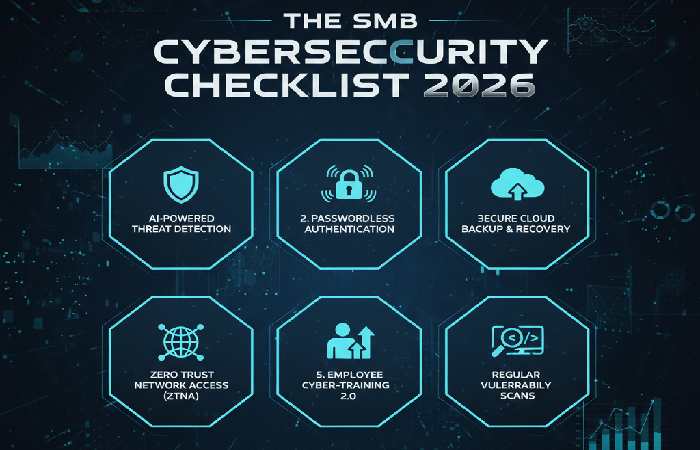
For organizations that need stronger technology leadership, hiring a CIO for your company can help align cybersecurity, IT infrastructure, digital transformation, and technology investments with broader business goals.
You don’t need an enterprise budget to be secure—but you must prioritize correctly.
The 5–10 Critical Security Controls to Implement First
- Multi-Factor Authentication (MFA)
Protects email, VPNs, cloud apps
Stops 90%+ of credential-based attacks - Automated, Immutable Backups
3-2-1 backup strategy
Offline or immutable backups prevent ransomware encryption - Patch & Update Management
OS, applications, firewalls, routers
Unpatched systems remain the #1 attack vector - Endpoint Protection (EDR/XDR)
Detects ransomware, malware, zero-day threats
Goes beyond traditional antivirus - Email Security & Anti-Phishing
AI-based phishing detection
DMARC, SPF, DKIM enforcement - Least-Privilege Access Control
Users get only what they need
Reduces lateral movement after breach - Network Segmentation
Limits spread of malware
Especially critical for servers and backups - Security Awareness Training
Human error causes ~70% of breaches
Quarterly phishing simulations recommended
How to Prioritize Based on Budget & Risk
Low Budget / High Risk (Start Here):
- MFA
- Backups
- Patch management
- Email security
Moderate Budget:
5. Endpoint detection (EDR)
6. Awareness training
7. Access control
Higher Maturity:
8. Network segmentation
9. SIEM / monitoring
10. Incident response planning
Rule of Thumb:
Protect identity, email, backups, and endpoints first—everything else builds on that foundation.
2026 Cybersecurity Checklist for Businesses (with Approx. Prices)
| Security Measure | What It Does | Approx. Cost (Annual) | Why It Matters |
| Firewall / UTM Appliance | Blocks unauthorized access & filters traffic | ₹20,000 – ₹150,000 / device (~$250–$1,800) | First line of defense at network edge |
| Endpoint Detection & Response (EDR) | Monitors endpoints for threats | ₹500 – ₹2,500 per device (~$6–$30) | Protects workstations/laptops |
| Antivirus + Real-Time Protection | Detects malware & viruses | ₹300 – ₹1,000 per device (~$4–$12) | Basic malware defense |
| Multi-Factor Authentication (MFA) | Adds second login factor | ₹100 – ₹300 per user (~$1.50–$4) | Reduces credential theft |
| Secure VPN Access | Encrypts remote access | ₹4,000 – ₹30,000 (~$50–$350) | Safeguards off-site connections |
| Email Security / Spam Filter | Blocks phishing & spam | ₹500 – ₹1,500 per user (~$6–$18) | Prevents business email compromise |
| Cloud Security (CASB) | Secures SaaS apps | ₹10,000 – ₹200,000 (~$125–$2,500) | For businesses on cloud apps |
| Security Awareness Training | Trains employees on threats | ₹500 – ₹2,000 per user (~$6–$25) | Reduces human risk vectors |
| Backup & Disaster Recovery | Automated backups & restore plans | ₹5,000 – ₹100,000 (~$60–$1,250) | Protects data from loss/ransomware |
| Patch Management Tool | Applies software updates automatically | ₹10,000 – ₹50,000 (~$125–$620) | Prevents exploitation of vulnerabilities |
| Web Application Firewall (WAF) | Protects web servers | ₹15,000 – ₹150,000+ (~$185–$1,800+) | Critical for public web apps |
| SIEM (Log & Threat Monitoring) | Centralizes and analyzes security logs | ₹50,000 – ₹300,000+ (~$620–$3,700+) | For proactive threat detection |
| Penetration Testing | Ethical hacking test | ₹30,000 – ₹200,000 (~$370–$2,500) | Finds weaknesses before attackers do |
| Cyber Insurance | Financial protection against breaches | ₹10,000 – ₹200,000 (~$125–$2,500) | Covers recovery costs & liability |
| Incident Response Plan | Formal breach response plan | ₹20,000 – ₹100,000 (~$250–$1,250) | Helps reduce downtime & loss |
Why Each Item Matters
| Category | Primary Goal |
| Prevention | Stop attacks from succeeding (e.g., firewall, antivirus) |
| Detection | Identify attacks early (e.g., SIEM, EDR) |
| Response | Minimize damage after an attack (e.g., patching, IR plan) |
| Recovery | Restore operations & data (e.g., backups, insurance) |
| Human Factor | Reduce risk by training employees |
Example Annual Budget (Small Business)
| Security Layer | Typical Annual Cost |
| Firewall + Antivirus | ₹40,000 – ₹80,000 |
| EDR + MFA | ₹30,000 – ₹80,000 |
| Cloud & Email Security | ₹20,000 – ₹50,000 |
| Backups & Patch Mgmt | ₹30,000 – ₹80,000 |
| Training + Insurance | ₹20,000 – ₹60,000 |
| Total Estimated | ₹140,000 – ₹350,000 / year (~$1,700–$4,400) |
Defending Against Ransomware in 2026:
Ransomware in 2026 is faster, stealthier, and more targeted—especially toward SMBs.
Latest Ransomware Infection Vectors
Phishing & Business Email Compromise (BEC)
Malicious links, fake invoices, QR-code phishing.
Compromised Remote Desktop (RDP)
Weak passwords or exposed RDP ports remain a major risk.
Supply Chain Attacks
Malware embedded in legitimate software updates.
Stolen Credentials
Purchased on dark web from previous breaches.
Malvertising & Fake Software Downloads
Common with cracked software and browser extensions.
A Practical Ransomware Prevention & Response Plan
Prevention
- Enforce MFA everywhere
- Disable exposed RDP or restrict via VPN
- Patch within 7 days of critical updates
- Use EDR with ransomware rollback
- Maintain offline/immutable backups
Detection
- Monitor unusual file encryption activity
- Alert on mass file renaming or privilege escalation
- Track login anomalies
Response
- Isolate infected systems immediately
- Disable compromised accounts
- Preserve logs for investigation
- Restore from clean backups
- Notify legal, insurers, and regulators if required
Never assume paying the ransom solves the problem.
Many victims are attacked again within months.
Security Tools Comparison: Firewall vs EDR vs SIEM
| Aspect | Firewall | EDR (Endpoint Detection & Response) | SIEM (Security Information & Event Management) |
| Primary Purpose | Controls network traffic | Detects & responds to endpoint threats | Collects & analyzes security data across systems |
| Protects Against | Unauthorized access, network attacks | Malware, ransomware, fileless attacks | Multi-vector threats through correlation & alerts |
| Focus Area | Network traffic layer | Endpoints (laptops, desktops, servers) | Entire IT infrastructure |
| Core Functionality | Rules-based traffic filtering | Behavioral monitoring & threat blocking | Log collection, correlation & alerting |
| Threat Detection | Basic to advanced signatures | Behavioral / anomaly detection | Cross-system analytics |
| Response Capability | Limited (block traffic) | Can quarantine, isolate endpoints | Supports incident workflows & playbooks |
| Data Visibility | Network traffic only | Endpoint processes & behavior | Enterprise-wide event visibility |
| Alerts / Monitoring | Low to medium | High on endpoint events | Very high — centralized alerts across sources |
| Threat Hunting | Limited | Yes (endpoint forensics) | Yes (across network & endpoints) |
| Incident Investigation | Basic logs (network) | Deep endpoint insights | Correlated logs from many sources |
| Deployment Location | Perimeter / network segments | On endpoints (agents) | Central server (cloud or on-prem) |
| Ease of Implementation | Easy to moderate | Moderate | Complex |
| Administrative Skill Needed | Basic to intermediate | Intermediate | Advanced |
| Integration with Tools | Works with routers & gateways | Integrates with SIEM | Integrates with firewalls, EDR, apps |
| Typical Use Cases | Block unauthorized access | Detect & contain endpoint malware | Enterprise security visibility & compliance |
| Cost Range | Low to mid | Mid to high | High |
| Best For | All organizations | Organizations with many endpoints | Large/complex environments with many systems |
| Examples | Cisco ASA, Fortinet, Palo Alto NGFW | CrowdStrike Falcon, Microsoft Defender for Endpoint | Splunk, IBM QRadar, ArcSight, Microsoft Sentinel |
When to Use Each
| Business Need | Recommended Tool(s) |
| Block unauthorized network traffic | Firewall |
| Detect advanced endpoint threats | EDR |
| Centralize logs & detect cross-system threats | SIEM |
| Compliance reporting & audit tracking | SIEM + Firewall logs |
| Fast endpoint containment | EDR |
Choosing Your Cybersecurity Partner: MSP vs. In-House vs. Security Tools
SMBs must decide how to manage security without overextending budgets.
MSP vs. In-House vs. Tools: Pros, Cons & Costs
| Option | Pros | Cons | Typical Cost |
| Security Tools Only | Low upfront cost | No monitoring or response | $20–$50/user/month |
| In-House Team | Full control | Expensive, hard to hire | $80k–$150k per staff/year |
| Managed Security Provider (MSP/MSSP) | 24/7 coverage, expertise | Less customization | $50–$150/user/month |
Best Fit for Most SMBs:
Managed Security Providers with strong automation and SLAs.
What to Look for When Evaluating Providers
Essential Features
- 24/7 monitoring & response
- Endpoint + email + identity protection
- Backup and disaster recovery support
- Threat intelligence integration
Critical SLAs
- Incident response time (< 1 hour)
- Guaranteed uptime
- Clear escalation paths
- Compliance support (GDPR, ISO, SOC 2)
Red Flags
No defined response timelines
Tool-only “managed” services
Lack of reporting or visibility
Cybersecurity Budget Planning by Company Size
| Security Category | Small Business | Mid-Size Company | Enterprise | Purpose / Helpful Link |
| Firewall / UTM | ₹20,000 – ₹80,000 (~$250–$1,000) | ₹80,000 – ₹250,000 (~$1,000–$3,000) | ₹250,000 – ₹1,000,000+ (~$3,000–$12,000+) | Network perimeter security
https://www.paloaltonetworks.com/resources/what-is-a-firewall |
| Endpoint Security (AV + EDR) | ₹10,000 – ₹40,000 (~$120–$500) | ₹40,000 – ₹150,000 (~$500–$1,800) | ₹150,000 – ₹600,000+ (~$1,800–$7,200+) | Malware & attack detection https://www.microsoft.com/security/blog/what-is-edr/ |
| Multi-Factor Authentication (MFA) | ₹10,000 – ₹30,000 (~$120–$360) | ₹30,000 – ₹90,000 (~$360–$1,100) | ₹90,000 – ₹300,000+ (~$1,100–$3,600+) | Protects login credentials https://auth0.com/learn/what-is-mfa/ |
| VPN / Secure Remote Access | ₹5,000 – ₹25,000 (~$60–$300) | ₹25,000 – ₹100,000 (~$300–$1,200) | ₹100,000 – ₹500,000+ (~$1,200–$6,000+) | Secures remote workers https://www.cisco.com/c/en/us/products/security/vpn-endpoint-security-clients/what-is-vpn.html |
| Email Security / Anti-Phishing | ₹10,000 – ₹40,000 (~$120–$500) | ₹40,000 – ₹120,000 (~$500–$1,500) | ₹120,000 – ₹500,000+ (~$1,500–$6,000+) | Blocks phishing & spam https://www.csoonline.com/article/3234711/what-is-email-security.html |
| Backups & Disaster Recovery | ₹15,000 – ₹60,000 (~$180–$720) | ₹60,000 – ₹200,000 (~$720–$2,400) | ₹200,000 – ₹800,000+ (~$2,400–$9,600+) | Data protection & recovery https://www.backblaze.com/blog/how-to-backup-your-computer/ |
| Security Awareness Training | ₹5,000 – ₹30,000 (~$60–$360) | ₹30,000 – ₹120,000 (~$360–$1,500) | ₹120,000 – ₹500,000+ (~$1,500–$6,000+) | Educates employees https://www.csoonline.com/article/2130877/what-is-security-awareness-training.html |
| Patch Management / Vulnerability Scanning | ₹10,000 – ₹40,000 (~$120–$500) | ₹40,000 – ₹150,000 (~$500–$1,800) | ₹150,000 – ₹600,000+ (~$1,800–$7,200+) | Minimizes exploitable bugs https://www.tenable.com/products/nessus |
| SIEM (Centralized Monitoring) | — | ₹80,000 – ₹300,000 (~$1,000–$3,600) | ₹300,000 – ₹1,500,000+ (~$3,600–$18,000+) | Log analysis & threat detection https://www.splunk.com/en_us/data-insider/what-is-siem.html |
| Penetration Testing (Annual) | ₹20,000 – ₹60,000 (~$240–$720) | ₹60,000 – ₹200,000 (~$720–$2,400) | ₹200,000 – ₹800,000+ (~$2,400–$9,600+) | Finds weaknesses proactively https://owasp.org/www-project-top-ten/ |
| Cyber Insurance | ₹10,000 – ₹50,000 (~$120–$600) | ₹50,000 – ₹200,000 (~$600–$2,400) | ₹200,000 – ₹800,000+ (~$2,400–$9,600+) | Covers breach costs https://www.iii.org/article/what-cyber-insurance |
| Incident Response Retainer | — | ₹50,000 – ₹150,000 (~$600–$1,800) | ₹150,000 – ₹600,000+ (~$1,800–$7,200+) | Expert breach support https://www.incidentresponse.com/ |
What These Budgets Typically Cover
Small Business (~₹100K – ₹500K)
- Basic firewall + antivirus
- MFA & email filtering
- Cloud backups
- Starter employee training
Goal: Protect against common threats & phishing.
Mid-Size Company (~₹600K – ₹2M)
- Advanced EDR + patch management
- SIEM or log monitoring
- Annual penetration testing
- Enhanced email & network security
- Cyber insurance + incident readiness
Goal: Detect & respond to threats across departments.
Enterprise (~₹2M – ₹7M+)
- Full SIEM + SOAR
- Dedicated security operations (SOC)
- Cloud application protection (CASB)
- Device posture management
- Continuous testing & compliance reporting
Goal: Resilient security across global environments.
Budgeting Tips for 2026
- Start small, plan to scale: Begin with essentials (MFA, EDR, firewall) and add advanced tools as you grow.
- Invest in people & process: Technology alone is not enough — employee training & clear policies are critical.
- Monitor & adjust annually: Threat landscape changes every year; revisit your budget regularly.
- Measure ROI: Track blocked threats, phishing simulations, and audit results to justify spend.