

A digital footprint is the trail of data that individuals leave behind when they use the internet or digital devices. These digital traces include information collected through online activities such as browsing, social media use, online purchases, searching, messaging, and device interactions.
Digital footprints can be intentional (voluntarily shared by the user) or unintentional (collected passively without the user’s explicit awareness).
Internet and Networking
Table of Contents
What Is a Digital Footprint?
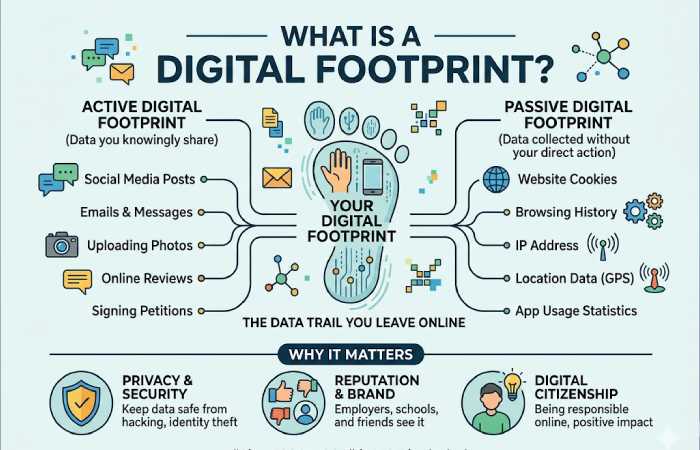
A digital footprint refers to data you leave behind while using the internet. This refers to the information that you share and the information that is collected without your realisation.
Digital footprints are generally categorized into two types:
- Active digital footprints – Data you knowingly share online
- Passive digital footprints – Data collected without direct input, often through tracking technologies
Digital Footprint Examples
Below is a clear and helpful table of common digital footprints, how they are made, and their impact.
| Digital Footprint Example | Type | Description | Potential Impact |
| Social media posts | Active | Photos, comments, likes, and shares on platforms like Instagram or Facebook | Affects personal reputation and online identity |
| Online shopping history | Passive | Data collected by websites when you browse or purchase items | Used for targeted ads and recommendations |
| Email subscriptions | Active | Signing up for newsletters or services | Can lead to marketing emails or data sharing |
| Location tracking | Passive | GPS data from apps and devices | Reveals movement patterns and daily routines |
| Search engine queries | Passive | Searches made on Google or Bing | Influences ads and personalized content |
| Online reviews | Active | Reviews posted on Google, Amazon, or Yelp | Impacts business credibility and public opinion |
| App permissions | Passive | Access granted to camera, mic, or contacts | Raises privacy and data security concerns |
| Cloud storage usage | Active | Uploading photos or files online | Long-term data storage footprint |
Why Digital Footprints Matter
Your digital footprint can influence:
- Job opportunities (employers often review online presence)
- Online privacy and security
- Targeted advertising and data profiling
- Personal and professional reputation
Once information is online, it can be difficult—sometimes impossible—to remove completely.
How to Manage and Reduce Your Digital Footprint
- Review privacy settings on social media regularly
- Limit app permissions to only what’s necessary
- Avoid oversharing personal details
- Use secure browsers and privacy tools
- Delete unused accounts
Being aware of our digital footprints helps us control our online image, rather than giving up our identity through algorithms.
Different Types of Digital Footprints
| Type of Digital Footprint | Definition | Examples | User Control Level | Impact on Privacy & Reputation |
| Active Digital Footprint | Data intentionally shared by users online | Social media posts, comments, online forms, blog posts, emails | High (user controls what is shared) | Strong impact; reflects personal or professional identity |
| Passive Digital Footprint | Data collected without direct user action | Website tracking cookies, IP addresses, browsing history | Low (often collected automatically) | High privacy risk if misused |
| Social Media Footprint | Information generated through social platforms | Likes, shares, followers, tagged photos | Medium | Directly affects personal branding |
| Search Engine Footprint | Data related to search behavior | Google searches, voice searches, search history | Low | Used for profiling and ad targeting |
| Professional Footprint | Online data related to work and career | LinkedIn profiles, portfolios, GitHub, company bios | High | Influences hiring and business credibility |
| Transactional Footprint | Data created through online purchases and payments | E-commerce orders, subscriptions, billing details | Medium | Financial and identity-related risks |
| Device & Technical Footprint | Data generated by devices and systems | Device ID, browser type, OS, location metadata | Very Low | Enables tracking and fingerprinting |
| Location-Based Footprint | Data showing physical movement and location | GPS apps, check-ins, ride-sharing apps | Low | Can expose sensitive location patterns |
| Communication Footprint | Data from digital communication | Emails, chat messages, video calls metadata | Medium | Important for compliance and security |
| Content Creation Footprint | Data from publishing digital content | Videos, blogs, podcasts, comments | High | Long-term visibility and reputation impact |
| Third-Party Footprint | Data shared by others about a user | Tagged photos, mentions, reviews | Very Low | Often difficult to control or remove |
| Educational Footprint | Data related to learning platforms | Online courses, test submissions, LMS activity | Medium | Academic and professional implications |
How Secure are your Digital Footprints
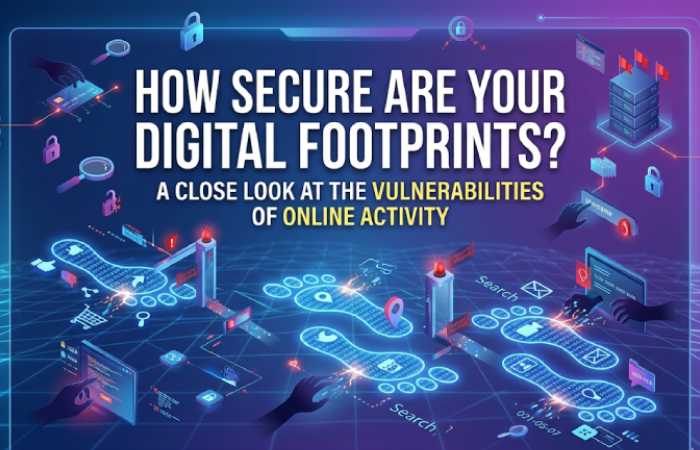
In case you submit a job application or an application for admittance, the online personality may be checked by various people. To support their decision-making process, employers, institutions, recruiters, and other organizations might have a look at your online persona. Accordingly, it is wise to behave as if you were responsible for your digital footprint when you are out there.
These are some of the measures you may take to protect your private life and to uphold an impressive personal branding on the web.
- Limit The Amount Of Information You Disclose Online.
It is necessary that you remain cautious at all times as to what kind of personal information you disclose on the internet. To protect your identity, share as little information as possible with other people and do not reveal any more personal details than are absolutely necessary. If this is the case, someone who gets hold of your data will probably use it in a way that you do not like.
- Take Caution With What You Disclose;
Definitely put on the safety armor when you go out to the internet battle. Especially if you are using the social media weapons. This way you keep away from revealing any sort of sensitive information which can be used to harm your reputation. Next, watch your posting habits to make sure that you don’t try to overwhelm them with too many posts.
- Stay Away From Useless Websites
Several adverts and links are available on the internet that you may consider strange or hazardous to your computer. If you continue to click on these links and ads. You will leave digital footprints such as malware on your device, spamming of emails and phone calls, and so on.
Tips to Minimize Your Digital Footprint Online
| Tip | What to Do | Why It Matters | Difficulty Level |
| Limit Personal Information Sharing | Avoid oversharing details like phone number, address, DOB on websites & social media | Reduces identity theft and profiling | Easy |
| Review Privacy Settings Regularly | Set social media accounts to private, limit data sharing | Controls who can see your information | Easy |
| Use Strong & Unique Passwords | Create different passwords for each account; use a password manager | Prevents account breaches | Medium |
| Enable Two-Factor Authentication (2FA) | Activate 2FA on email, social, and banking apps | Adds an extra security layer | Easy |
| Clear Cookies & Browser History | Regularly delete cookies and cached data | Reduces tracking by advertisers | Easy |
| Use Privacy-Focused Browsers | Switch to browsers like Brave or Firefox | Blocks trackers by default | Easy |
| Avoid Unnecessary App Permissions | Disable location, camera, and mic access when not needed | Prevents data misuse | Medium |
| Be Careful with Public Wi-Fi | Avoid logging into sensitive accounts on public networks | Protects personal data | Medium |
| Remove Old & Unused Accounts | Delete accounts you no longer use | Reduces stored personal data | Medium |
| Opt Out of Data Collection | Use “Do Not Track” and ad personalization settings | Limits targeted advertising | Easy |
| Think Before You Post | Avoid sharing real-time location or sensitive info | Prevents long-term digital exposure | Easy |
| Use a VPN When Necessary | Encrypt your internet connection | Hides IP address and location | Medium |
| Check Google Search Results About You | Search your name and request removals if needed | Manages online reputation | Easy |
| Update Devices & Software | Keep OS and apps up to date | Fixes security vulnerabilities | Easy |
| Read Terms & Privacy Policies | Understand how your data is used before signing up | Avoids unwanted data sharing | Hard |
Tools & Techniques for Managing Digital Footprints
Here’s a comprehensive comparison table of effective tools and techniques to help you manage, monitor, and protect your digital footprint — including privacy, reputation, and data exposure.
| Tool / Technique | Category | Primary Function | Pricing (Approx.) | Review / Notes | Resources |
DeleteMe |
Data removal service | Removes your personal info from data brokers | $129/year (individual); $229/year (family) | Very effective for automated removal; quarterly reports with monitor alerts | https://joindeleteme.com/ |
Privacy.com |
Virtual cards | Creates virtual credit cards to protect real card details | Free; $10/mo Pro; $25/mo Premium | Helps stop tracking via payment data leaks | — |
VPN (e.g., ProtonVPN, Mullvad) |
VPN privacy | Encrypts internet traffic & hides IP address | $60/yr (ProtonVPN); ~$5.50/mo (Mullvad) | Blocks ISP tracking & enhances online privacy | — |
Dashlane |
Password manager | Securely stores passwords + dark web monitoring | ~$59.99/yr (Premium) | High security and password management + VPN integration | — |
Bitwarden |
Password manager | Open-source password vault + sync | Free; Premium optional | Robust free tier; can self-host; strong security | https://bitwarden.com/ |
NordPass |
Password manager | Encrypted password vault with breach scanner | Freemium | Zero-knowledge vault + 2FA support | |
Brave Browser |
Privacy browser | Blocks trackers and ads; privacy-first browsing | Free (core) | Blocks tracking, speeds browsing, built-in privacy tools | — |
DuckDuckGo Browser/Search |
Privacy browser/search | No tracking search + privacy features | Free | Blocks trackers and hides search history | — |
Firefox Relay |
Email aliasing | Generates masked emails to protect real one | Free / Paid tiers | Shields real email from leaks and phishing | — |
Manual Monitoring (e.g., Google Alerts) |
DIY monitoring | Notifies you when your name appears online | Free | Requires manual setup; low cost and useful | — |
O&O ShutUp10++ |
System privacy tool | Enhances Windows privacy settings | Free | Free tool to disable telemetry and tracking | — |
Anti-fingerprinting Extensions (e.g., Privacy Badger) |
Browser extension | Blocks trackers and fingerprinting | Free | Reduces tracking fingerprint and data profiling | — |
Digital Footprints and AI: How Your Past Data Shapes Your Future Opportunities
| Area of Impact | How AI Uses Digital Footprint Data | Potential Positive Outcomes | Potential Risks / Challenges | Real-World Examples |
| Personalized Recommendations | AI analyzes browsing history, clicks, search behavior | More relevant suggestions (products, content) | Filter bubbles & reduced diversity of ideas | YouTube/Netflix recommending videos based on watch history |
| Job Matching & Recruitment | AI systems scan resumes, social profiles, behavior patterns | Better job fit suggestions & faster hiring matches | Bias based on past activity, unfair filtering | LinkedIn AI job recommendations |
| Credit & Finance Decisions | Credit scoring algorithms incorporate online financial behavior | Faster loan approvals & tailored finance products | Inaccurate data could hurt creditworthiness | FinTech apps using alternative data for lending |
| Ad Targeting & Marketing | AI uses past behavior to target ads | More relevant advertising, higher engagement | Privacy concerns, oversharing personal data | Ads on Meta & Google based on search/activity data |
| Education & Learning Pathways | Learning AI tracks course progress & preferences | Custom curriculum suggestions | Over-optimization, limiting exposure to new skills | EdTech platforms recommending next courses |
| Health & Wellness Predictions | AI uses wearables & search history for insights | Early alerts, wellness suggestions | Sensitive data exposure, incorrect predictions | Fitness apps predicting health trends |
| Behavioral Analytics & UX | AI refines user experiences from interaction data | Smoother interfaces & personalized UX | Unwanted manipulation or over-optimization | E-commerce UX optimized based on behavior |
| Risk & Threat Detection | AI analyzes past patterns to detect anomalies | Better fraud prevention & security | False positives affecting trusted users | Banks flagging unusual transactions via AI |
| Credit & Insurance Pricing | AI models incorporate historical behavior data | Custom pricing & offers | Lack of transparency; discrimination concerns | Insurance companies using driver data to set rates |
| Content Moderation & Safety | AI uses past content activity to filter harmful content | Safer online environments | Censorship or inaccurate filtering | Social platforms auto-removing flagged posts |
Key Themes: How Data Influences Opportunity
| Theme | How AI Leverages Data | Impact on Future Opportunities |
| Personalization | Tailors recommendations & experiences | Better satisfaction & relevance |
| Prediction | Uses patterns to forecast behavior | Prevents issues and enhances decision support |
| Optimization | Improves performance & efficiency | Higher engagement & conversion |
| Risk & Safety | Identifies anomalies & threats | Protects users but can misclassify |
| Bias Reinforcement | Uses historical patterns | May reinforce unfair outcomes |
Positive Outcomes vs. Risks (Summary)
| Positive Opportunities | Associated Risks |
| Better job and study recommendations | Privacy erosion |
| Improved health and wellness alerts | Unintended profiling |
| Enhanced user experience and personalization | Discrimination based on data |
| Faster financial decisions | Over-reliance on flawed datasets |
How Your Digital Footprint Can Lead to Financial Fraud
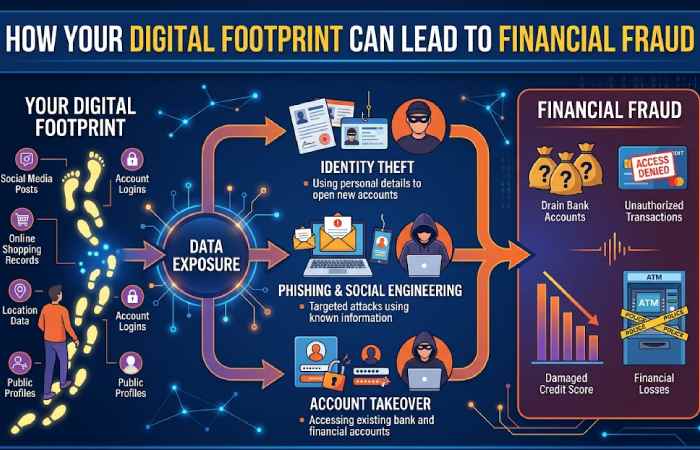
Cybercriminals can use digital footprints for perpetrating theft and financial frauds. As information increases, more victims are created to exploit.
Common Ways Digital Footprints Lead to Fraud
- Publicly shared personal details used for identity theft
- Data breaches exposing emails, passwords, or phone numbers
- Social engineering attacks using information from social media
- Phishing scams tailored using your online behavior
How to Protect Yourself
- Use strong, unique passwords for every account
- Enable two-factor authentication (2FA)
- Avoid oversharing personal or financial details online
- Regularly monitor bank accounts and credit reports
- Delete unused accounts and old apps
Being proactive about your digital footprint is one of the most effective ways to prevent financial loss and online identity misuse.
Managing Your Child’s Digital Footprint
| Area | What Parents Should Do | Why It Matters | Helpful Tools / Tips |
| Account Creation | Create accounts together; use minimal personal info | Prevents early data exposure | Use parent email for sign-ups |
| Privacy Settings | Set profiles to private; review settings regularly | Limits who can view your child’s data | Check settings monthly |
| Social Media Use | Delay social media until age-appropriate | Reduces long-term footprint | Follow platform age guidelines |
| Photo & Video Sharing | Avoid posting school, location, or uniform photos | Protects identity and location | Disable auto-tagging |
| Parental Controls | Enable parental controls on devices and apps | Filters unsafe content | Google Family Link, Apple Screen Time |
| App Permissions | Review location, camera, mic access | Prevents unnecessary data collection | Allow “only while using app” |
| Search & Browsing | Use kid-safe browsers and search engines | Limits exposure to harmful content | SafeSearch, Kid-friendly browsers |
| Gaming Platforms | Disable public chat & friend requests | Prevents online harassment | Use private servers |
| Online Learning Tools | Review school app data policies | Protects educational data | Ask schools about data storage |
| Cyberbullying Awareness | Teach children how to report & block | Protects mental well-being | Keep communication open |
| Password Management | Use strong passwords & 2FA | Prevents account takeovers | Password managers |
| Digital Education | Teach children what a digital footprint is | Builds long-term awareness | Age-appropriate conversations |
| Monitoring Without Spying | Discuss activity instead of secret monitoring | Builds trust | Weekly check-ins |
| Account Cleanup | Delete unused apps and accounts | Reduces stored data | Quarterly audits |
| Role Modeling | Practice good digital behavior yourself | Children copy adult habits | Lead by example |
Conclusion
Kindly do not post anything personally identifiable to you just because you do not like your friend’s FB status or perhaps disagree with a friend. Make sure to check your privacy settings frequently and be assured that you are safe.