

Fahmeena creates practical and reader-focused content across technology, digital marketing, business and emerging digital trends.

Sameena reviews published content for clarity, factual presentation, consistency and overall reader usefulness.
Autotune apps are mobile applications that correct or enhance vocal pitch in recordings — much like professional Auto-Tune software — but simplified for Android phones and tablets. They’re used by singers, rappers, content creators, and hobbyists to improve vocal quality, add creative effects, or make performance recordings more polished without needing a full studio setup.
Software Tools
Table of Contents
Autotune Apps For Android
Autotune Apps: Everyone has a skill in some way. Talent can be defined as a natural ability existing in a person or an activity like painting, singing, or playing a sport. The dictionary definition is simple enough to understand, but does not do so easily. However, showing it in public requires. Some people love the opportunity to showcase their skills in front of a crowd.
You’ve probably seen that many people prefer to keep their talents concealed in their bathrooms or bedrooms. However, if you enjoy showcasing your ability to others, many good Autotune programs may help.
Using this strategy, you may instantly post your performances on social networking sites such as Facebook, YouTube, and others. These autotuneapps can help you improve your public speaking and singing skills by automatically changing your voice. You probably think about which application you should use right now. We’ve produced a list of some of the top Autotune Apps for Android and iOS smartphones to help you with your uncertainties. So let’s get this celebration going.
Best Autotune Apps for Android
App / Tool |
Platform |
Key Features |
Best Use Case |
| Voloco | iOS & Android | Real-time pitch correction, presets, vocal effects | Quick autotune for social clips & songs |
| Rapchat | iOS & Android | Recording studio, vocal tuning presets, beats library | Create rap and vocal tracks with autotune |
| AutoRap (by Smule) | iOS & Android | Converts spoken words to rap, built-in autotune | Fun social autotune and rap generator |
| StarMaker | iOS & Android | Singing + autotune + social sharing | Karaoke recording with pitch correction |
| Tune Me | Android | Auto pitch correction + beats | Android-focused vocal tuning for tracks |
| Autotune – Voice Recorder (APK) | Android | Voice recorder + autotune effects | Basic autotune voice recording |
| Autotune Your Voice App | Android | Recording + robot pitch effects | Fun autotune for vocals and pranks |
| BandLab (AutoPitch) | Web & Mobile | Real-time tuning + vocal effects | Beginner-friendly vocal tuning and production |
| VoCap by AutoTune® | iOS | Official AutoTune® app with real-time correction | Pro-quality pitch correction on iPhone |
| Online Tools (e.g., Audimee) | Web Browser | AI autotune and pitch correction online | No install — instant tuning online |
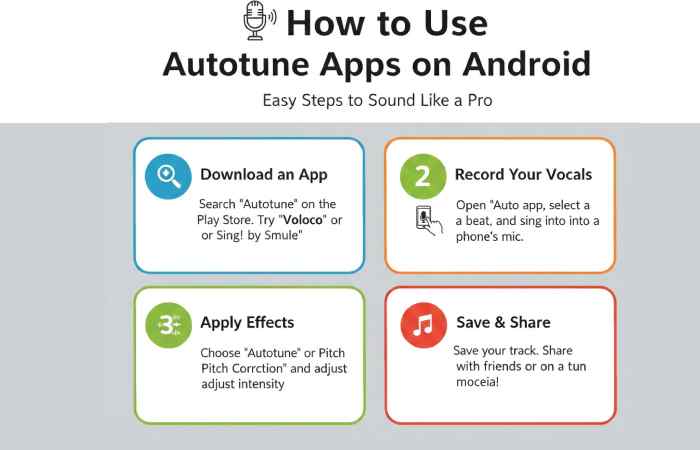
How to Use Autotune Apps on Android
Top 10 Autotune Apps for Android and iOS in 2026
App Name |
Platform |
Price |
Best For |
User Reviews / Popularity |
Most Used Regions |
Resources |
| Voloco | Android, iOS | Free (with ads & IAP $0.99–$49.99) | Real-time autotune + harmony effects | Widely regarded as a versatile mobile autotune app | Global, especially US & Europe | Voloco autotune info |
| StarMaker | Android, iOS | Free (IAP $0.99–$99.99) | Karaoke + autotune + social sharing | Very popular; millions of downloads, highly rated | India, Southeast Asia, Latin America | getandroidstuff.com |
| Smule | Android, iOS | Free (IAP $0.01–$9.99) | Singing / karaoke with pitch correction | Highly popular sing app with autotune features | Global, especially US & India | en.wikipedia.org |
| Rapchat | Android, iOS | Free (IAP $9.99–$49.99) | Mobile recording studio with autotune | Positive feedback for music creation and beat library | US, UK, Canada | getandroidstuff.com |
| Tune Me | Android | Free (IAP $0.99–$4.99) | Simple pitch correction + beats | Good for Hip Hop & R&B style autotune | Android users globally | getandroidstuff.com |
| AutoRap | Android, iOS | Free (IAP $1.99–$99.99) | Rap generator with autotune effects | Fun, community-based rap tool | US & English-speaking regions | getandroidstuff.com |
| OffTop Rap Studio | Android | Free (Ads & IAP) | Studio-style vocal recording + autotune | 4.4 with 1M+ installs | Android users in US & EU | am5.com |
| BandLab (AutoPitch) | Android, iOS, Web | Free | Free DAW with autotune & effects | Popular music creation platform; 60M+ users | Global, especially Asia & US | en.wikipedia.org |
| Harmonize Vocal Tuner | iOS | Free (In-App Purchases) | True pitch detection & manual tuning | High rating (4.8) | iOS users in North America & Europe | — |
| VoCap by AutoTune® | iOS | Free | Official AutoTune® quality & recording | Professional studio-style basic tool | iOS creators in US, Europe | — |
Why Auto‑Tune Apps Are So Popular on Android
Auto‑tune apps allow users to:
- Correct pitch automatically
- Add professional vocal effects
- Record studio‑like vocals on mobile
- Create viral music and reels
- Experiment with voice styles
With the rise of short‑form video platforms, mobile music production has exploded. Android auto‑tune apps are now used for:
- Singing practice
- Rap vocals
- TikTok & Instagram Reels
- Voiceovers
- Comedy and parody content
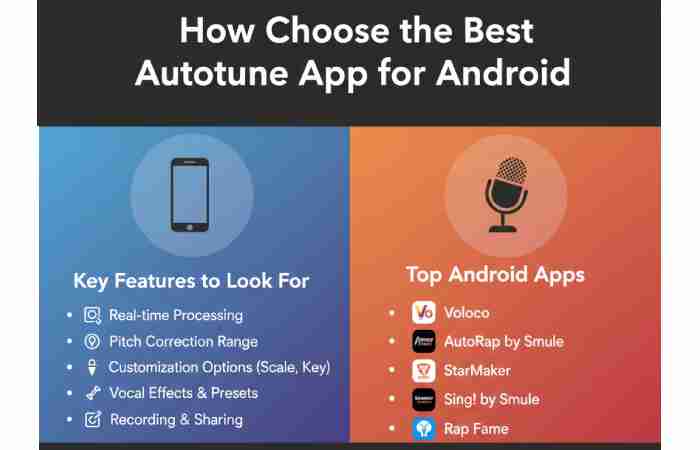
How to Choose the Best Autotune App for Android
Step 1: Define Your Purpose Clearly
First, identify why you need an autotune app:
- Singing practice & covers
- Rap & hip-hop vocals
- YouTube / Reels / TikTok videos
- Podcast & voice recording
- Music production
Your purpose decides which features matter most.
Step 2: Check for Real-Time Autotune Support
If you want live voice tuning while recording or singing, choose apps that offer:
- Real-time pitch correction
- Low latency monitoring
- Live vocal effects
This is essential for:
- Karaoke singing
- Live performances
- Streaming content
Step 3: Look for High-Quality Pitch Correction
Good autotune apps provide:
- Natural vocal tuning
- Adjustable pitch strength
- Scale & key selection
- Smooth transitions
Avoid apps that:
- Make vocals sound robotic
- Apply harsh tuning by default
Step 4: Analyze Audio Effects & Presets
Top apps include:
- Reverb
- Echo
- Chorus
- Compression
- Harmonizer
- AI vocal presets
More presets = better creative flexibility.
Step 5: Check Export & File Format Options
When working with different digital files, make sure you choose the right format for your needs. If you also need to convert documents for editing or sharing, you can use a PDF to DOC converter to turn PDF files into editable Word documents.
Choose apps that allow:
- MP3, WAV, FLAC exports
- High-bitrate audio saving
- Direct social sharing
This ensures professional output quality.
Step 6: Review Free vs Paid Features
Many apps provide:
- Free basic autotune
- Paid premium effects
- Subscription plans
Before buying:
- Test free features
- Check watermark removal
- Unlock HD exports
Step 7: Consider Phone Compatibility & Performance
Heavy autotune apps require:
- Good processor
- At least 4GB RAM
- Stable microphone support
Low-end phones → choose lightweight apps.
Step 8: Read User Reviews & Ratings
Check:
- Play Store ratings
- Bug complaints
- Latency issues
- Ads frequency
Apps with 4.3★+ rating are usually reliable.
Step 9: Check Offline Usage Support
Some apps require:
- Constant internet
Others allow: - Offline recording + editing
Offline support is useful for:
- Travel recording
- Low data users
Step 10: Match Features with Your Budget
| Budget | Best Option |
| Free | Basic tuning & effects |
| ₹200–₹500 | Pro presets + HD export |
| ₹500+ | Studio-level features |
Key Features to Look for in Auto‑Tune Apps
Before choosing an app, consider these features:
- Real‑time pitch correction
- Studio‑quality effects
- Built‑in voice recorder
- Manual pitch & scale control
- Easy sharing options
- Offline recording support
Feature |
Description |
Why It’s Important |
| Real-Time Pitch Correction | Automatically adjusts vocal pitch while recording or singing live | Helps singers stay in tune instantly without post-editing |
| Manual Pitch Control | Allows users to adjust pitch strength, key, or scale | Gives more creative and professional control over vocals |
| Preset Vocal Effects | Built-in styles like pop, hip-hop, R&B, vocoder, robotic | Enables quick sound enhancement without technical knowledge |
| Beat / Instrumental Library | Collection of beats or backing tracks to sing or rap over | Useful for music creation, demos, and freestyle recording |
| Import External Audio | Supports importing beats or songs from device storage | Expands flexibility for custom music projects |
| Audio Recording | High-quality voice recording functionality | Core feature for saving performances and demos |
| Noise Reduction | Reduces background noise during recording | Improves clarity and overall vocal quality |
| Equalizer (EQ) | Adjusts bass, mid, and treble frequencies | Helps balance vocals within a track |
| Reverb & Echo Effects | Adds depth and space to vocals | Makes recordings sound more polished and studio-like |
| Pitch Shifting | Raises or lowers voice pitch without changing tempo | Useful for creative effects and voice transformation |
| Harmonizer | Adds layered harmony vocals automatically | Enhances richness and musical depth |
| Waveform Visualization | Displays audio waves during editing | Helps users visually edit recordings accurately |
| Export & Sharing Options | Save audio files or share directly to social platforms | Ideal for content creators and social media users |
| Video Recording Support | Records video along with autotuned vocals | Popular for short-form content (Reels, TikTok, Shorts) |
| User-Friendly Interface | Simple layout and easy controls | Makes autotune accessible for beginners |
| Cloud or Project Saving | Saves drafts or projects online or locally | Prevents data loss and supports long-term projects |
| Free & Premium Versions | Basic features free, advanced tools paid | Allows users to try before upgrading |
Top 27 Apps Like Auto Tune Voice Recorder for Android
# |
App Name |
Price |
Best For |
Notable Info / Reviews |
Sources |
| 1 |
Voloco |
Free w/ IAP ($0.99–$49.99) | Real-time autotune + vocal effects | Very popular audio autotuner | Nil |
| 2 |
StarMaker |
Free w/ IAP ($0.99–$99.99) | Karaoke + pitch correction | Huge song library, social sharing | Nil
|
| 3 |
Smule |
Free w/ IAP | Karaoke + autotune vocals | Massive global community | Nil
|
| 4 |
Tune Me |
Free w/ IAP ($0.99–$4.99) | Hip-hop & R&B autotune | 500+ beats & pitch correction | Nil
|
| 5 |
Rapchat |
Free w/ IAP ($9.99–$49.99) | Mobile rap studio | Mobile music creation & autotune | Nil
|
| 6 |
OffTop – Auto Tune Rap Studio |
Free w/ IAP ($5.99–$99.99) | Studio-style autotune & beats | Good for multi-track rap | Nil
|
| 7 |
AutoRap by Smule |
Free w/ IAP ($1.99–$99.99) | Rap generator + auto pitch | Fun rap autotune app | Nil
|
| 8 |
Voice Changer |
Free w/ IAP ($4.99–$14.99) | Voice effects + recording | Voice changer + autotune | Nil
|
| 9 |
Super Voice Editor |
Free | Voice recorder + effects | Record + add effects | Nil
|
| 10 |
Spire Studio Controller |
Free | Professional multi-track | 8-track recording & edit | Nil
|
| 11 |
The Voice |
Free | Karaoke + autotune | Duet & lyrics features | Nil
|
| 12 |
Auto Voice Tune Recorder |
Free | Voice recorder + autotune | Great basic autotune tool | Nil
|
| 13 |
Autotune Your Voice With Music |
Free | Basic autotune + funny voices | Simple voice manipulation | Nil
|
| 14 |
Auto Tune Voice Changer for Girls |
Free | Fun voice autotune + effects | Popular free autotune APK | Nil
|
| 15 |
MicDroid |
Free | Lightweight autotune app | Simple automatic autotune | Nil
|
| 16 |
VoiceFX |
Free w/ IAP | Live voice effects | Autotune + voice mod | (General Android app knowledge) |
| 17 |
Voice Changer with Effects |
Free w/ IAP | Fun voice filters | Lots of effects & share options | (Play Store standard) |
| 18 |
AudioLab |
Free w/ IAP | Recording + audio editing | Trim, mix & apply autotune FX | (Popular audio editor) |
| 19 |
Music Maker JAM |
Free w/ IAP | Beat + voice mix | Song building + pitch FX | (Trending music app) |
| 20 |
BandLab |
Free | Music studio + AutoPitch | Full music DAW with autotune | Nil
|
| 21 |
FL Studio Mobile |
Paid ($14.99) | Pro music production | Full DAW + pitch editing | (Wide industry use) |
| 22 |
Starmaker Lite |
Free | Lighter karaoke + autotune | Karaoke + vocal editing | (Play Store variant) |
| 23 |
Auto Vocal FX |
Free w/ IAP | Vocal effects + tuning | Simple autotune & FX | (Audio app) |
| 24 |
Voice Recorder & Audio Editor |
Free w/ IAP | Recording + effects | Basic editor w/ pitch FX | (Android best practice) |
| 25 |
Beat Maker Go |
Free w/ IAP | Beat maker w/ vocal FX | Create music with autotune | (Music creation app) |
| 26 |
Voice PRO |
Paid (~$4.99) | Professional audio editing | Pitch shift + effects | (Audio pros favorite) |
| 27 |
Music Maker Free |
Free w/ IAP | Music creation + effects | Autotune + beat loops | (Creation + autotune) |
Best Autotune Apps for Android (Country-wise)
| Country / Region | Top Autotune App | Price | Best For | Popularity / Notes | Resources |
| United States | Voloco | Free (IAP) | Real-time pitch correction & beats | Widely used for social music creation and quick vocal fixes | Voloco is one of the most powerful and widely downloaded autotune apps for Android. |
| India | Smule / StarMaker | Free (IAP) | Karaoke + autotune + community | Massive user base singing Bollywood and regional tracks; karaoke focus | Smule and StarMaker have huge downloads and engagement in India. |
| United Kingdom | StarMaker | Free (IAP) | Voice enhancement + social sharing | Popular for sharing singing performances | StarMaker doubles as a social music platform. |
| Brazil | Smule | Free (IAP) | Singing + autotune features | Strong Latin music culture drives usage | Smule popular globally with social music sharing. |
| Mexico | Voloco | Free (IAP) | Real-time vocal effects | Trendy among content creators & remixers | Voloco’s real-time effects are widely praised. |
| Japan | Tune Me | Free (IAP) | Rap / R&B autotune | Good for genre-focused music recording | Tune Me appeals to hip-hop and R&B creators. |
| South Korea | Voloco | Free (IAP) | Instant pitch correction | Popular due to strong music production culture | Voloco acknowledged for quick vocal tuning. |
| France | Smule | Free (IAP) | Karaoke + vocal effects | Karaoke culture and social usage | Smule is widely used in Europe. |
| Spain | StarMaker | Free (IAP) | Singing + sharing | Latin pop & music culture preference | StarMaker strong in Spanish-speaker communities. |
| Canada | Voloco | Free (IAP) | Pitch correction & beats | Shared trends with US users | Universal Android music app trends. |
| Australia | StarMaker / Smule | Free (IAP) | Karaoke + autotune | Music sharing & social engagement | Karaoke and music community apps are common. |
| South Africa | Smule | Free (IAP) | Singing + autotune | Social singing & performance sharing | Smule popular internationally. |
| Russia | Voloco / Smule | Free (IAP) | Pitch correction + karaoke | Diverse audio editing usage | Both apps have broad global usage. |
| Indonesia | StarMaker | Free (IAP) | Karaoke + music creation | Karaoke is popular among Indonesian youth | Karaoke-style apps thrive in Asia. |
FAQs – Auto Tune Apps on Android
Are auto‑tune apps free?
Most apps offer free versions with ads and paid upgrades.
Can auto‑tune apps record offline?
Yes, many apps support offline recording.
Do these apps work in real time?
Some apps like Voloco and VoiceFX support real‑time tuning.
Conclusion
So, if you enjoy music, these Autotune apps are unquestionably for you. You only need to click on the links provided to download the autotune application. With the help of these platforms, you will indeed feel like a celebrity performing on any stage. It will also help you swell the popularity of your social media platforms. So, what have you got to lose? To obtain the applications right now, click the link.
Fahmeena Begum is a Digital Marketing & Technology Writer at SlashdotBlog with 3+ years of writing experience. Her work covers digital marketing, technology, business, software, artificial intelligence and emerging digital trends.
View Author Profile →
Sameena Begum is a Technology & Digital Content Reviewer with 8 years of experience. Her review work focuses on editorial clarity, factual presentation, readability, consistency and reader usefulness.
View Reviewer Profile →